How to plan a program before writing code: read the problem, think, break it into steps, draw it, then write pseudocode and test cases
If you want to learn programming, the first skill is not a programming language. It is planning. In this lesson I explain algorithm and flowchart basics: how to turn a problem into clear steps, how to draw those steps with a few simple shapes, and how to write the same plan as pseudocode before any real code.
The video is in Hinglish (Hindi and English). This article covers the same ideas in English, so you can read them, revise them and come back to them as the series grows.
What is an algorithm?
When a problem, or a program to write, comes to us, we follow the same four moves:
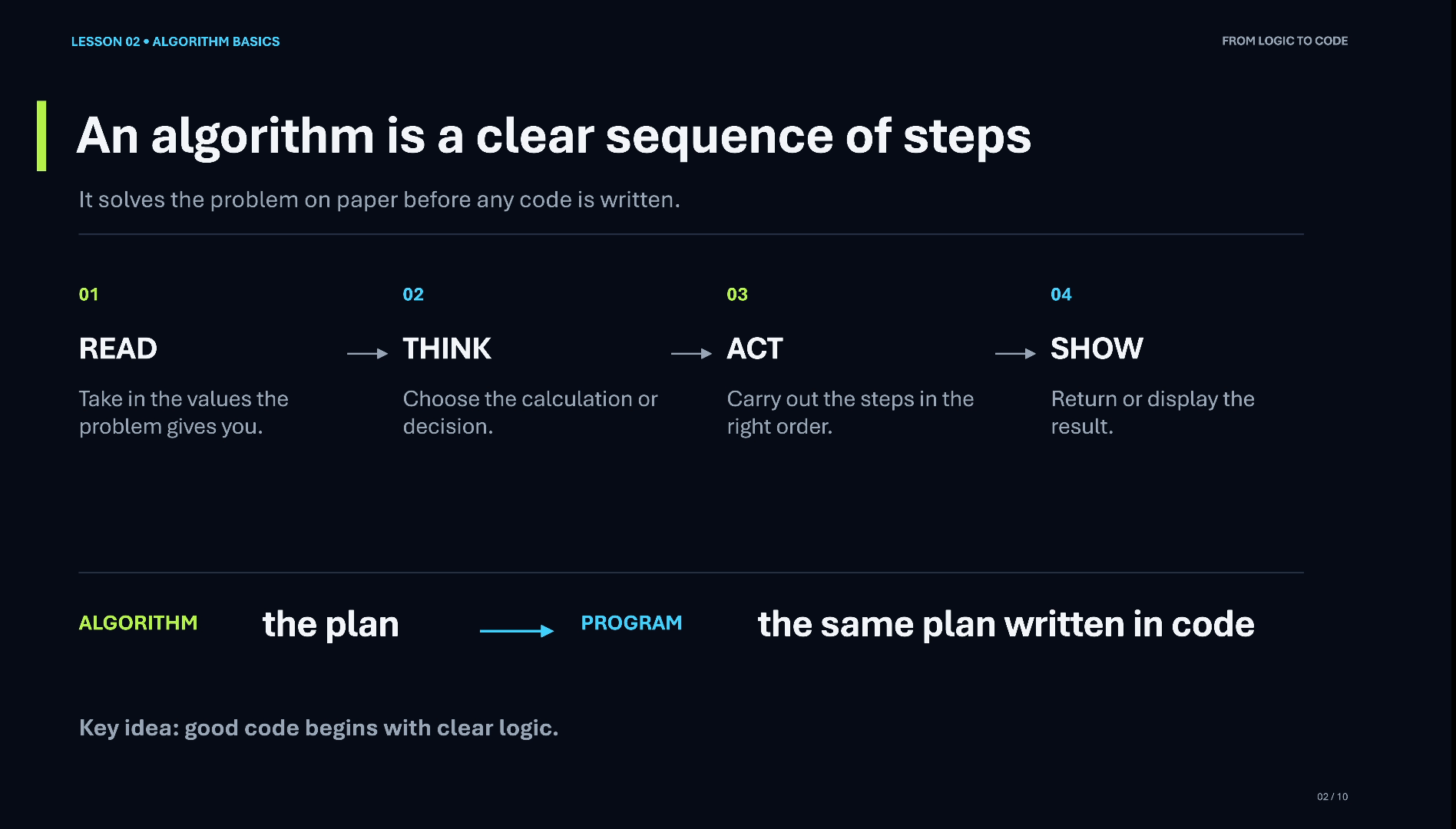
- Read the problem. Until you read it properly, you cannot understand what is being asked.
- Think about it, including the different scenarios it can face.
- Divide the solution into different steps.
- Order the steps: first this step, after that this one, then the next.
An algorithm is exactly that: a clear sequence of steps that solves the problem, planned before any code is written. When we write an algorithm, this is what we take care of: the planning, and the order in which the steps will be executed so that our solution gives a good result.
Thinking is a programming skill
Thinking is a very good skill that every programmer needs. It does not mean you have to do some deep, complicated thinking. It means how well you understand the problem. If you cannot think a problem through, you have not really understood it yet.
Once you have thought it through and a solution starts to take shape (“this can be the solution”), you divide it into steps and put those steps in order.
Algorithm and flowchart: why we draw the steps
A flowchart is the graphical representation of an algorithm’s steps. Shapes make the flow easy to follow, which is why they work so well for beginners.
I explain it the way we teach children. We do not start with the spelling of apple. We show a picture of an apple a few times, and only then teach the spelling. In the same way, when the steps of a problem are shown through shapes, the flow of the algorithm becomes easy to understand.
The flowchart symbols
You only need a handful of symbols to draw a beginner flowchart:
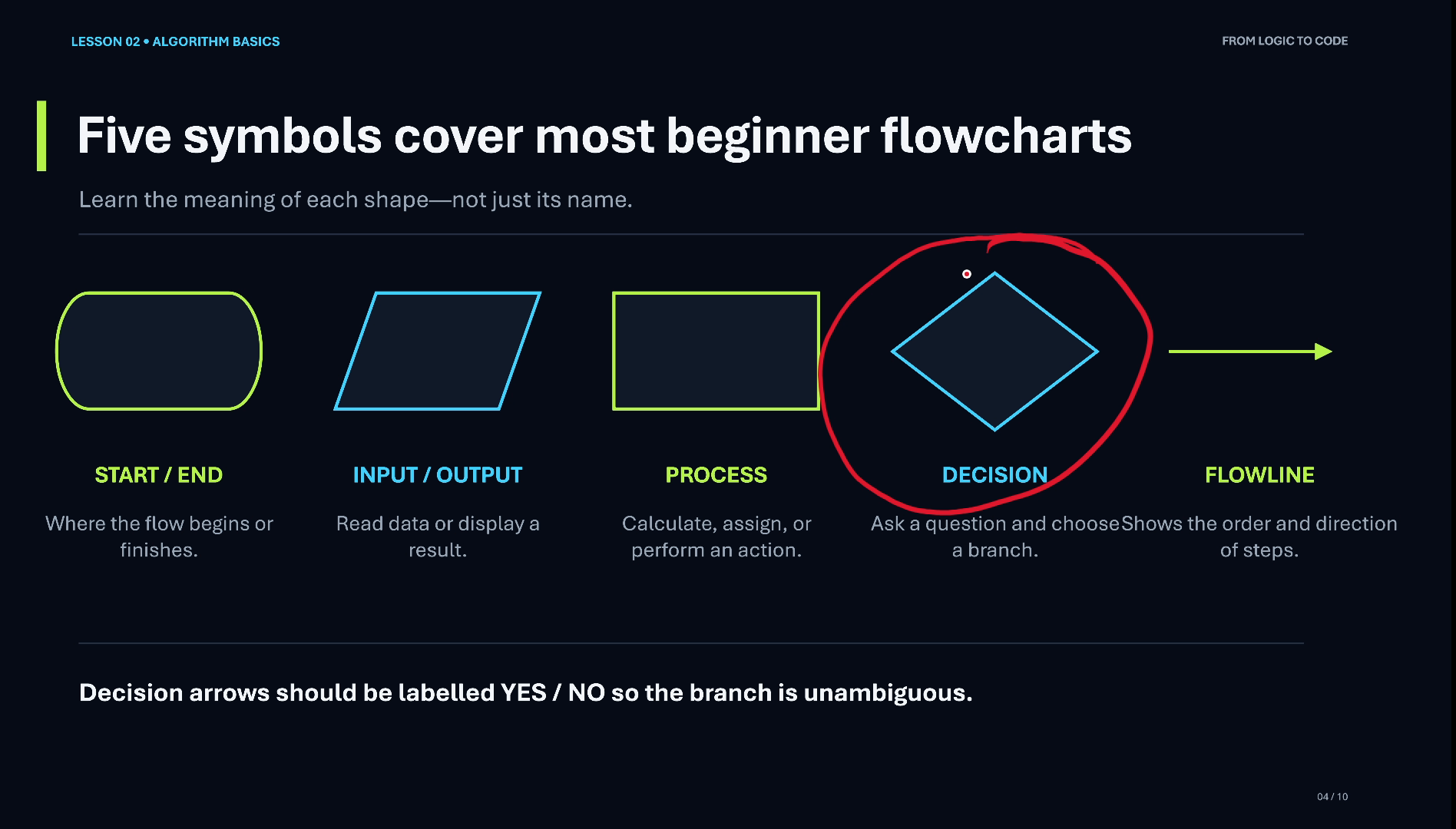
- Start / End (rounded shape): every flowchart begins with the start symbol and finishes with the end symbol. Both use the same shape.
- Flow line (arrow): shows which step comes after which.
- Input / Output (slanted rectangle): used wherever we read something or show a result.
- Process (straight rectangle): a processing step, such as a calculation.
- Decision (diamond): where the program chooses between two paths.
Remember from the last lecture that every program has three parts: input, process and output. The symbols map onto them directly.
Decisions are what make a program intelligent: if something is true, do this; otherwise, do that. I will explain decisions in detail in a later lesson.
Example: a flowchart to add two numbers
Let’s apply this to the most basic problem: adding two numbers. Before drawing anything, think about it and define its three parts:
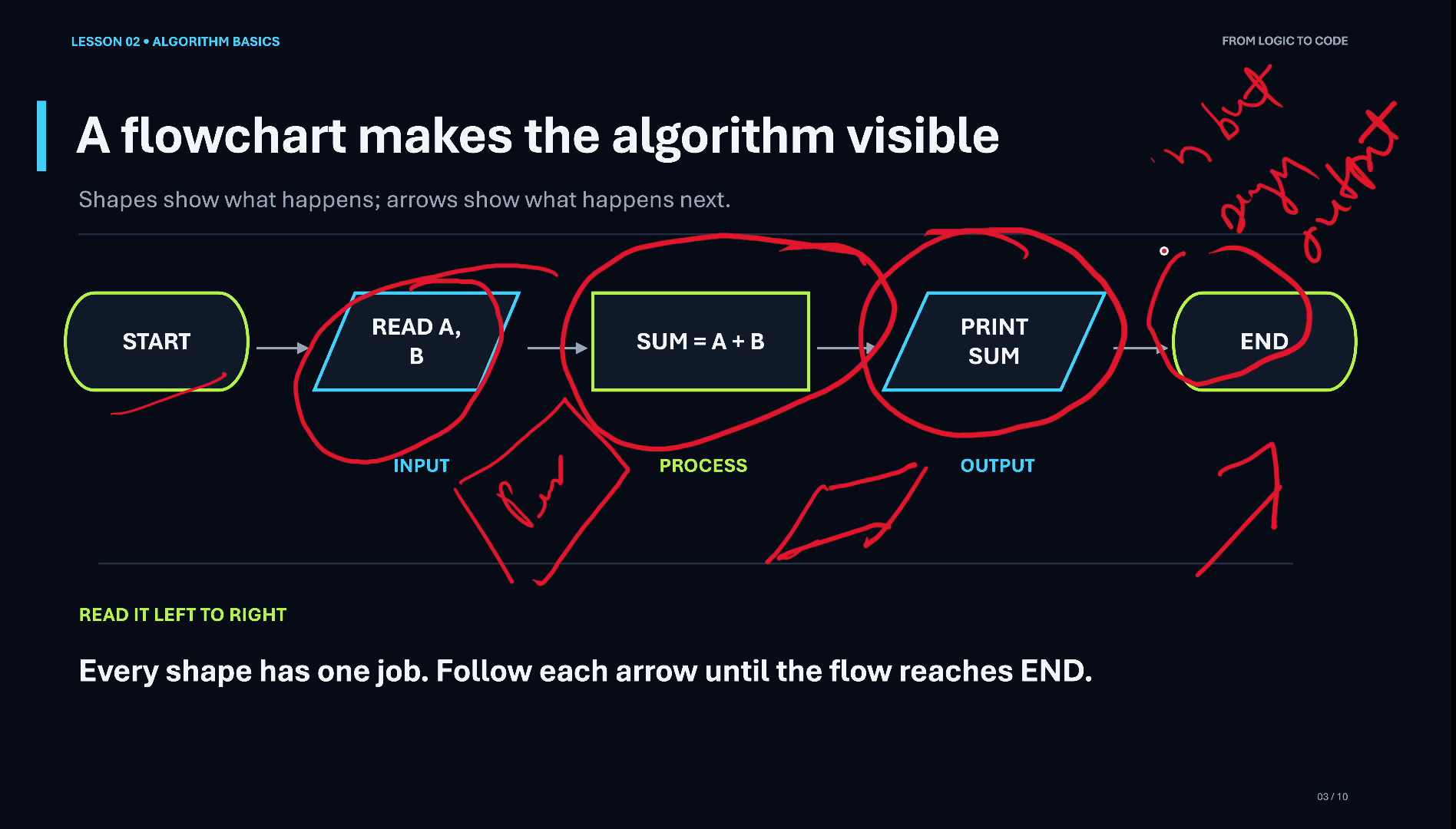
- Input: two numbers, number one and number two. They can be any numbers; the user enters them when the program runs.
- Process: sum = number one + number two.
- Output: the sum.
With that thinking done, the flowchart follows directly:
START
  ↓
Read A, B
  ↓
Sum = A + B
  ↓
Print Sum
  ↓
END
Always finish with the End symbol.
From flowchart to pseudocode
Pseudocode is the same plan written as plain steps instead of shapes. It is not code. It is like the rough work we used to do in maths: on copy and pen, before the real calculation.
Read A
Read B
Sum = A + B
Print Sum
With that, we have planned a program that gives the sum of two numbers, without writing a single line of a programming language.
Test cases: checking the plan
To test the program, we also write test cases: inputs together with the result we expect.
- 2 + 5 should give 7
- 5 + 11 should give 16
Then walk through the flowchart with the first test case. The program starts, reads A = 2 and B = 5, calculates the sum 2 + 5 = 7, and prints 7. The result matches, so the test passes. Writing test cases like this is a habit we will keep practising with every flowchart in the series.
What comes next in this series
In the next lessons we will solve flowchart problems step by step: first basic problems, then medium-level ones, and then pro-level programs with flowcharts and pseudocode.
Many videos only explain the theory. When I was starting my career, I faced the same gap: I understood the theory, but how would I implement it practically? So I will teach the technique: how to design a flowchart for a problem, including the kind of questions asked in campus placements.
Video chapters
- 0:00 What is an algorithm
- 2:07 Flowchart: an algorithm in shapes
- 3:09 Flowchart symbols
- 5:28 Example: add two numbers
- 7:06 Drawing the flowchart
- 8:22 Pseudocode
- 9:04 Test cases
- 10:14 What's next in the series
Watch the short versions
Short on time? These Shorts from this lesson each make one point in a minute or so.
- What is an Algorithm? 4 Simple Steps (72 s Short, coming soon, from 0:24 in the full video)
- Flowchart Symbols Explained for Beginners (70 s Short, coming soon, from 3:13 in the full video)
- What is Pseudocode? (Sum of Two Numbers) (38 s Short, coming soon, from 8:21 in the full video)
Key takeaways
- An algorithm is a clear sequence of steps: read the problem, think, divide the solution into steps, order the steps.
- Thinking means understanding the problem, and it is a core programming skill.
- A flowchart is the graphical representation of an algorithm.
- Five symbols cover beginner flowcharts: start/end, flow line, input/output, process and decision.
- Pseudocode is the same plan as plain steps: the rough work before code.
- Test cases (2 + 5 = 7, 5 + 11 = 16) check that the plan gives the right result.
Frequently asked questions
What is the difference between an algorithm and a flowchart?
An algorithm is the plan: a clear sequence of steps that solves a problem. A flowchart is the same plan drawn with shapes and arrows, so the flow of the steps is easy to see at a glance.
What are the basic flowchart symbols?
Start/End (a rounded shape), the flow line (an arrow), Input/Output (a slanted rectangle), Process (a straight rectangle) and Decision (a diamond). Every flowchart begins with Start and finishes with End.
What is pseudocode?
Pseudocode is the plan written as plain steps, such as Read A, Read B, Sum = A + B, Print Sum. It is not tied to any programming language; it is the rough work you do before writing real code.
Why write test cases for such a simple program?
A test case is an input with the result you expect, such as 2 + 5 = 7. Walking through the flowchart with it shows whether the plan really works, and the habit pays off as the problems get harder.
Do I need to know a programming language for this lesson?
No. Algorithms, flowcharts and pseudocode need only a notebook and a pen. Code comes after the plan is clear.
Further reading
- Algorithm (Wikipedia): the formal definition and history of algorithms
- Flowchart (Wikipedia): the standard flowchart symbols and how they are read
- Pseudocode (Wikipedia): common pseudocode conventions
Next in the series, we start solving flowchart problems, from basic to pro level.
If you want to learn programming from zero, watch the video, subscribe to the channel and follow the series. Questions? Leave them in the comments.