What <, >, <= and >= do, how AND and OR combine conditions, and how to turn a grading rule into a complete flowchart
Every program that makes a decision first has to compare something: is the marks above the pass line, is the age at least 18, is this number bigger than that one? In this lesson I explain comparison operators, the four you will use most, and how every comparison ends in true or false. Then the two logical operators, AND and OR, that join conditions together. Finally we use all of them on a real problem: turning a percentage into a grade, with a complete flowchart.
The video is in Hinglish (Hindi and English). This article covers the same ideas in English, so you can read them, revise them and come back to them as the series grows.
What comparison operators do
An operator works on operands. A comparison operator takes two values, compares them, and gives back exactly one of two answers: true or false. In flowchart language that is the same as yes or no.
That is why comparison operators sit inside the decision diamond of a flowchart, and inside every if in code: the comparison produces true or false, and the program takes the matching path.
The four comparison operators you will use most
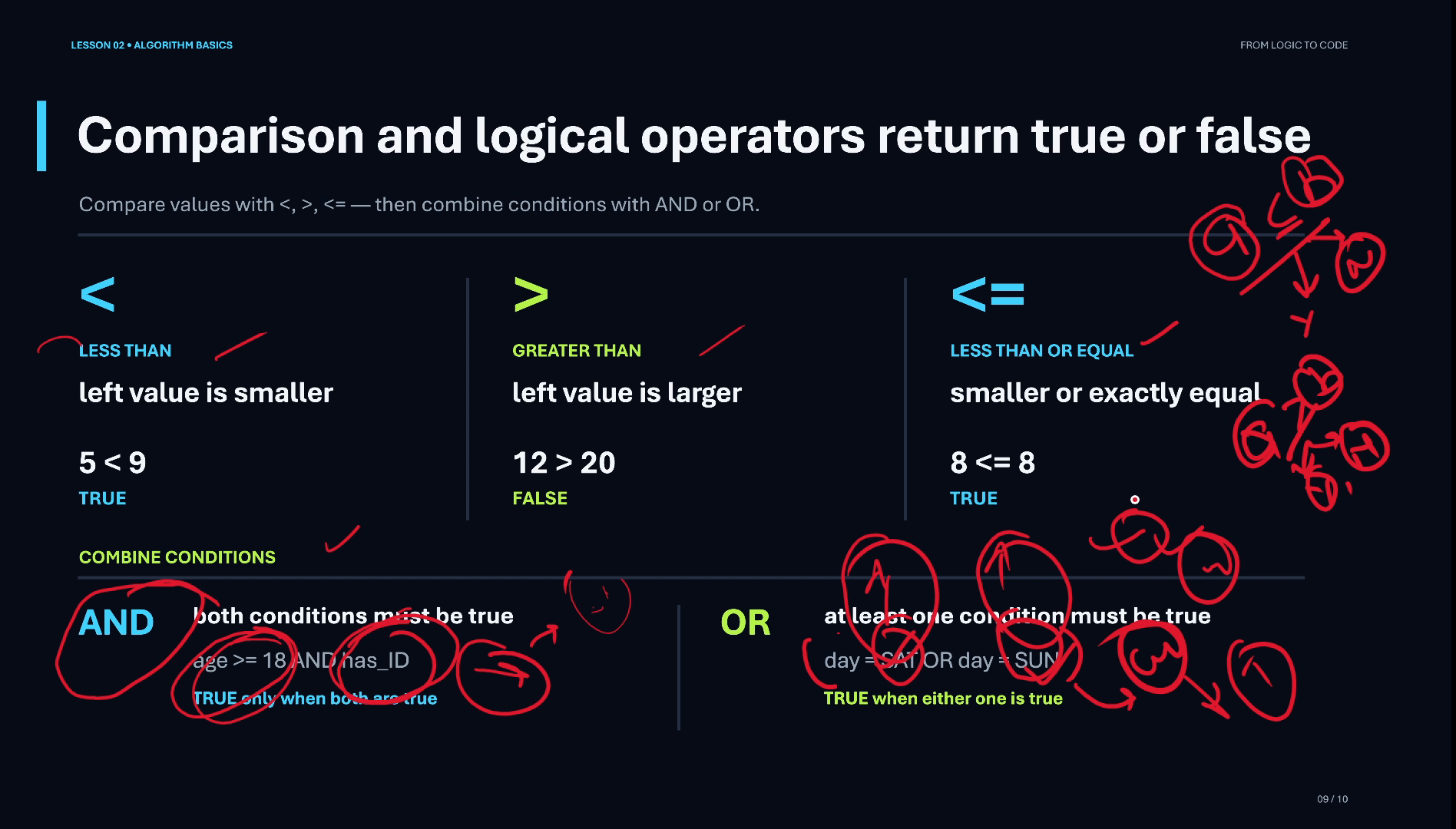
- < (less than): true when the left value is smaller.
5 < 9is true. - > (greater than): true when the left value is larger.
12 > 20is false. - <= (less than or equal to): true when the left value is smaller or exactly equal.
8 <= 8is true. - >= (greater than or equal to): true when the left value is larger or exactly equal.
Most languages also have == (equal to) and != (not equal to). We will use them in later lessons.
Reading A < B, A > B and A >= B
Say we write A < B. The program checks whether A is smaller than B. If it is, the answer is yes (true); if it is not, the answer is no (false).
A > B works the same way in the other direction: is A bigger than B?
A >= B asks a slightly bigger question: is A bigger than B, or equal to B? If either one of those holds, the answer is yes; only when A is smaller is it no. Remembering that “or equal” part is what keeps edge values, like a score of exactly 80, in the right place.
So comparison operators are how a program compares two values, two operands: which one is bigger, which is smaller, or whether they are equal.
Combining conditions: AND and OR
Sometimes one comparison is not enough and a decision depends on two conditions at once. That is where the logical operators come in.
AND is true only when both conditions are true. The example on the slide: a person can vote when age >= 18 AND has_ID. If either part is false, the whole condition is false.
OR is true when at least one condition is true. The example: I play cricket when day = SAT OR day = SUN. Any one of the two days is enough.
A simple way to remember it: AND is strict (every condition must pass), OR is relaxed (one passing condition is enough).
The problem: a grade from a percentage
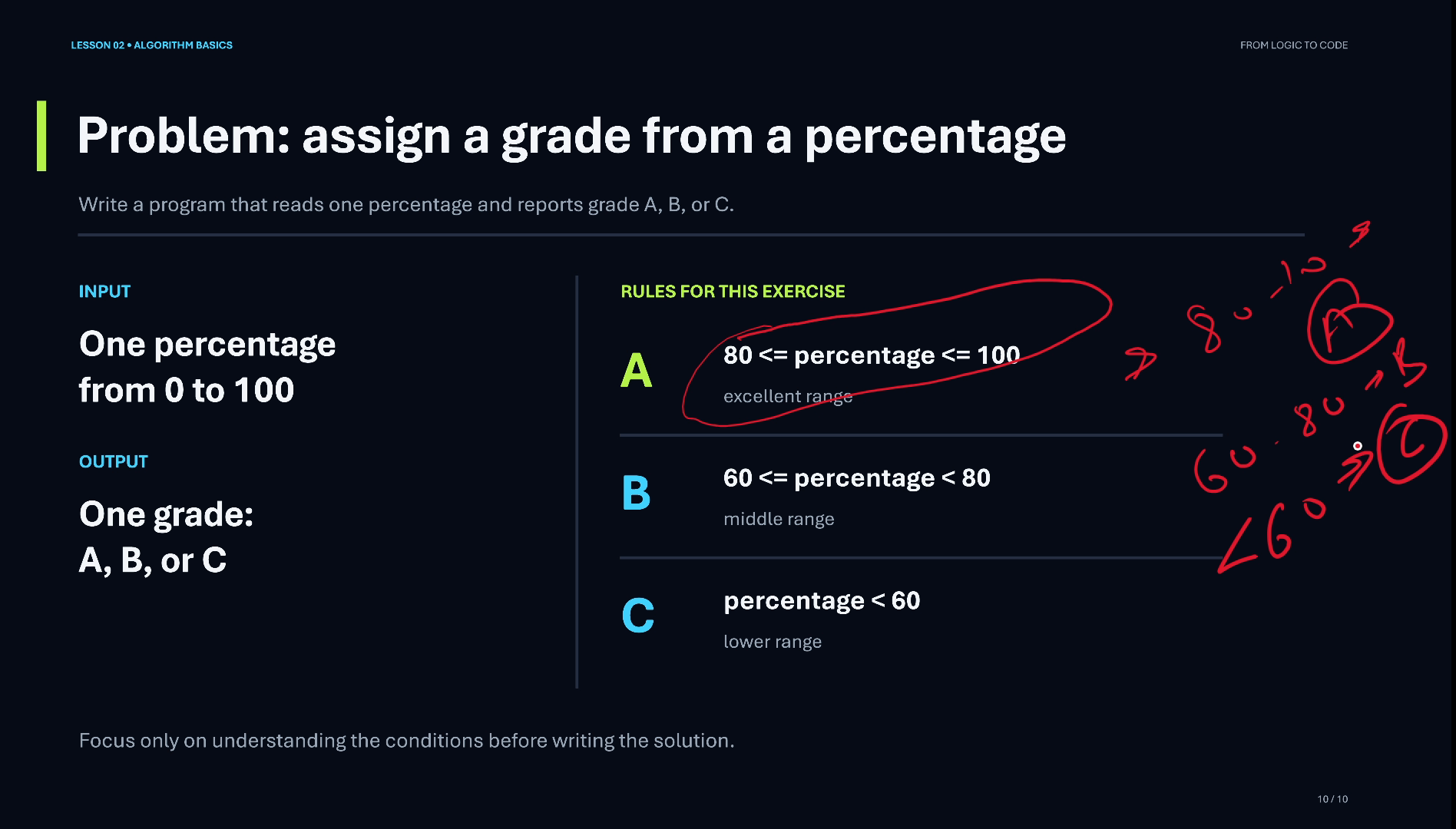
Now let’s use comparison operators on a real exercise: write a program that reads one percentage and reports grade A, B or C.
The rules for this exercise:
- A: 80 <= percentage <= 100
- B: 60 <= percentage < 80 (that is, 60 to 79)
- C: percentage < 60
Notice how each rule is already a comparison, or two comparisons joined together. That is the whole trick of turning a rule written in words into something a program can check.
Think before you draw: input, process, output
Before drawing anything, think the problem through, step by step, with the habit from the earlier lessons:
- Input: one percentage. That is all the program needs.
- Process: checks on the percentage: is it in the A range, the B range, or the C range?
- Output: one grade, A, B or C.
Because there are three grades, there are up to three decisions in a row: if the first check fails, we go on to the next one; if that fails too, the next. Writing this down first makes the flowchart almost draw itself.
Drawing the grading flowchart
Now the flowchart, in the same order as the thinking:
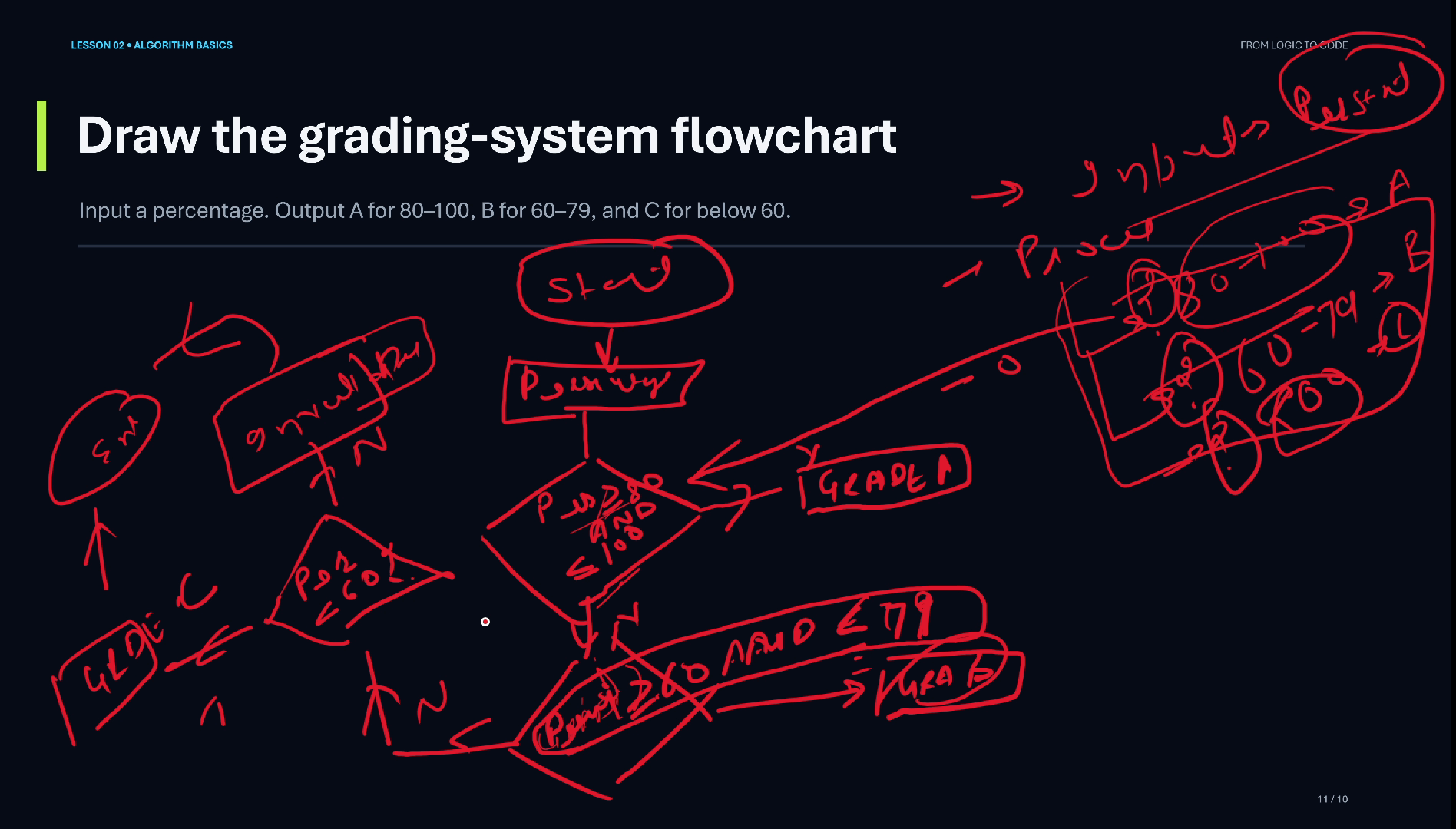
- Start.
- Read the percentage (an input box).
- First check:
percentage >= 80 AND percentage <= 100? If YES, the grade is A. - If NO, second check:
percentage >= 60 AND percentage <= 79? If YES, the grade is B. - If NO, third check:
percentage < 60? If YES, the grade is C. - If NO again, the percentage must be above 100, which is impossible, so print Invalid.
- Every path ends at End.
Notice how the first two checks each join two comparisons with AND: the percentage must be at least the lower bound and at most the upper bound. Each NO leads to the next diamond: this chain of decisions is the flowchart form of an else-if ladder.
A quick check of the edge values
Edge values are where beginners lose marks, so test them on paper before any code:
- 80 → A (because 80 <= 80 is true)
- 79 → B
- 60 → B (because 60 <= 60 is true)
- 59 → C
If your conditions give these four answers, your flowchart is right at the boundaries.
Video chapters
- 0:00 What comparison operators do
- 0:50 A < B, A > B, <= and >=
- 1:34 AND and OR: combining conditions
- 3:11 Problem: a grade from a percentage
- 4:02 Think first: input, process, output
- 5:02 Drawing the grading flowchart
- 7:11 Recap and a practice tip
Watch the short versions
Short on time? These Shorts from this lesson each make one point in a minute or so.
- Comparison Operators: <, >, <=, >= Explained (63 s Short, coming soon, from 0:24 in the full video)
- Grade from a Percentage: Think Before You Draw (82 s Short, coming soon, from 3:29 in the full video)
Key takeaways
- A comparison operator compares two values and gives true or false.
- The four you will use most: <, >, <= and >=.
- AND is true only when both conditions are true; OR is true when at least one is.
- Grade rules turn into comparisons joined with AND: 80 <= percentage <= 100 is A, 60 to 79 is B, below 60 is C.
- Think input, process and output first; then draw the flowchart in that order.
- Always add a path for invalid input, and make every path reach End.
Frequently asked questions
What are comparison operators?
Operators that compare two values and give true or false: less than (<), greater than (>), less than or equal to (<=) and greater than or equal to (>=), plus equal to (==) and not equal to (!=) in most languages.
What is the difference between > and >=?
is true only when the left value is bigger. >= is also true when the two values are equal. For a grade rule starting at 80, use >= so that exactly 80 counts.
Why do comparison operators matter in a flowchart?
Every decision diamond holds a condition, and a condition is usually a comparison. Its true or false answer decides which path the flowchart follows.
How do I check if a percentage is between 80 and 100?
Use two comparisons joined with AND: percentage >= 80 AND percentage <= 100. Both must be true.
What grade does a percentage of exactly 80 get in this exercise?
A, because the A rule is 80 <= percentage <= 100 and 80 <= 80 is true.
What is the difference between AND and OR?
AND is true only when both conditions are true (age >= 18 AND has ID). OR is true when at least one is true (Saturday OR Sunday).
Further reading
- Comparison operators (Microsoft C# reference): <, >, <= and >= and their true/false results
- Boolean logical operators (Microsoft C# reference): AND: true only when both operands are true
- Flowchart (Wikipedia): the decision symbol and its paths
Practice: draw the grading flowchart in your notebook yourself, then test it with 80, 79, 60, 59 and 101.
If you want to learn programming from zero, watch the video, subscribe to the channel and follow the series.