How a programmer turns two sensor readings and four rules into decisions and actions, then draws the complete flowchart
Most flowchart examples for beginners are about passing an exam or checking a voting age. Useful, but small. In this lesson I take a flowchart real life example instead: a smart greenhouse that reads two sensors and decides, on its own, when to sound an alarm and when to water the plants. Then I draw the flowchart a programmer would draw for it, step by step.
The video is in Hinglish (Hindi and English). This article covers the same ideas in English, so you can read them, revise them and try the practice at the end.
The problem: protect plants in a smart greenhouse
The greenhouse has two sensors:
- Temperature in °C
- Soil moisture in %
From those two readings the program has to control three outputs: an alarm (on or off), a water pump (off, 5 seconds or 10 seconds) and a status (COLD, HOT, DRY or NORMAL).
The thresholds below are an exercise, not gardening advice. The point is the thinking, not the numbers.
The four rules, in priority order
- Temperature <= 10°C: COLD alarm ON, pump OFF.
- Temperature >= 40°C: HOT alarm ON; if moisture is below 35%, water for 10 seconds.
- Otherwise, moisture < 25%: DRY status, water for 5 seconds, alarm OFF.
- Otherwise: NORMAL status, pump OFF, alarm OFF.
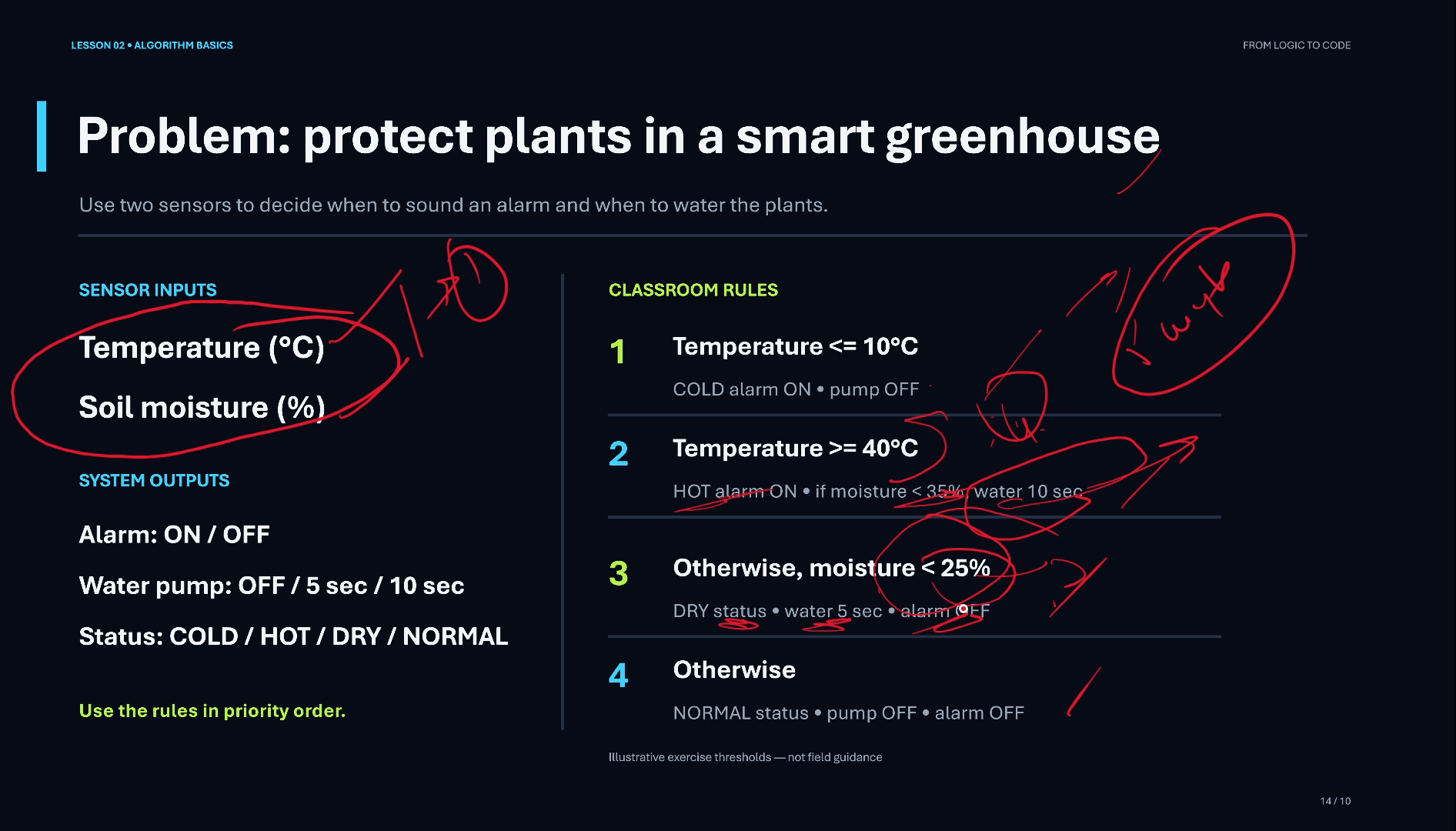
Priority order means the rules are checked from top to bottom and the first one that matches wins. Rule 3 only runs when rules 1 and 2 were both false. That is exactly what an else-if ladder does in code.
Think first: inputs, decisions, actions
Before drawing anything, write down three lists, as I do on the slide in the video:
- Inputs: moisture and temperature (from the sensors).
- Decisions: temperature <= 10? temperature >= 40? moisture < 25%?
- Actions: pump on or off (and for how long), alarm on or off, status.
Once these lists are on paper, the flowchart almost draws itself.
A flowchart real life example: drawing the greenhouse controller
- Start.
- Input box: read moisture and temperature.
- First decision: temperature <= 10? If YES: pump OFF, alarm ON, status COLD.
- If NO, second decision: temperature >= 40? If YES: alarm ON, status HOT, and water for 10 seconds when moisture is below 35%.
- If NO, third decision: moisture < 25%? If YES: pump ON for 5 seconds, status DRY.
- If NO: status NORMAL, pump and alarm OFF.
- Every path ends at End.
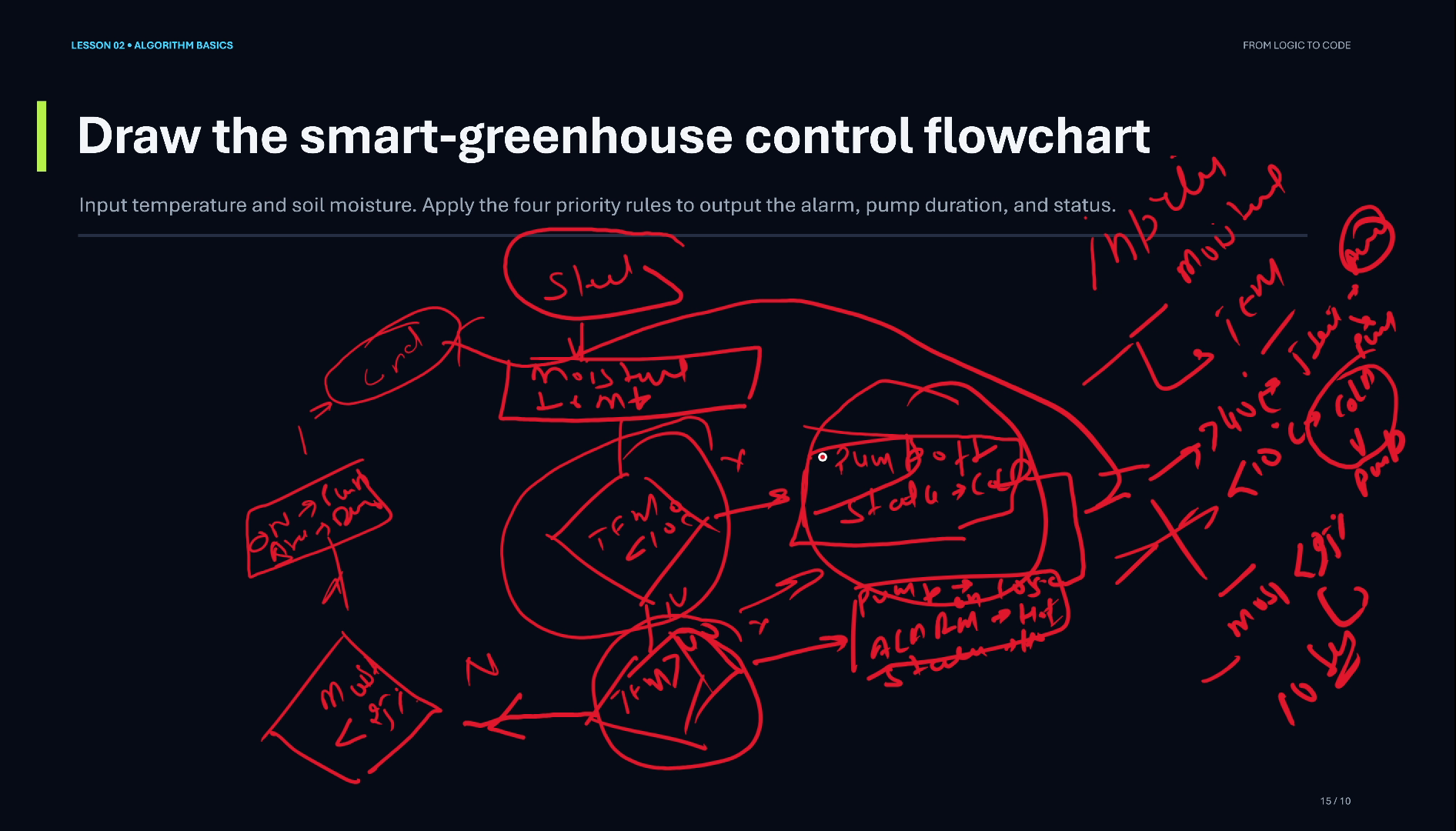
In the video I draw the first three decisions and their YES boxes live. Step 6, the NORMAL path, is left for you: add it to your copy so that every NO has somewhere to go.
Why the order of the checks matters
Take a reading of 42°C with 20% moisture. It matches rule 2 (hot) and rule 3 (dry). Because rule 2 is checked first, the greenhouse sounds the HOT alarm and waters for 10 seconds; the DRY rule never runs.
Swap the order and the same reading would give DRY status and only 5 seconds of water, with no alarm. Same rules, different program. When conditions can overlap, the order is part of the logic.
Inputs, decisions, outputs: the pattern behind real programs
This is the real-world scenario I mention at the end of the video: a program takes inputs, makes decisions on them, and produces outputs. Here the outputs are actions (switching a pump, sounding an alarm) as well as information (a status).
Smart thermostats, irrigation controllers and many simple automation systems start from exactly this shape before anything else is added.
Video chapters
- 0:00 A real-world problem: a smart greenhouse
- 0:34 Two sensors: temperature and moisture
- 1:16 The rules, in priority order
- 2:11 Note the inputs and decisions first
- 3:23 Drawing the greenhouse flowchart
- 5:45 Recap: inputs, decisions, actions
Watch the short versions
Short on time? These Shorts from this lesson each make one point in a minute or so.
- Smart Greenhouse Rules: If-Else in Priority Order (Short, link after upload)
- Drawing a Flowchart: Start, Inputs, First Decision (Short, link after upload)
Key takeaways
- Start every problem by listing inputs, decisions and actions.
- Two sensors (temperature, soil moisture) drive three outputs: alarm, pump and status.
- Rules in priority order become an else-if ladder: the first match wins.
- When conditions overlap, changing their order changes the result.
- Give every decision a YES and a NO path, and make every path reach End.
Frequently asked questions
What is a real-life example of a flowchart?
A smart greenhouse controller: it reads temperature and soil moisture, checks a few rules in order, and decides whether to sound an alarm and how long to run the water pump.
What does ‘priority order’ mean in a flowchart?
The decisions are checked one after another and the first condition that is true decides the action. Later checks only run when the earlier ones were false, like an else-if ladder in code.
Why is the decision box a diamond?
The diamond is the standard flowchart symbol for a decision: it holds a yes/no question and has one exit for each answer.
Do I need to know a programming language for this?
No. The flowchart is the plan. Once the plan is right, writing it as if / else if / else in any language is the easy part.
Further reading
- Flowchart (Wikipedia): standard symbols: terminal, input/output, process, decision
- Nested conditional statements (University of Denver, Intro to Python): nested decisions and their flowcharts
- 14 Programming Flowchart Examples (Creately): common beginner flowchart examples
Practice: draw the complete greenhouse flowchart, including the NORMAL path, then trace these readings through it: 8°C and 50%, 42°C and 30%, 25°C and 20%, 25°C and 60%.
If you want to learn programming from zero, watch the video, subscribe to the channel and follow the series.